
If you want to check whether two listings are the same product, ignore the name and find the model code.
Names are written by whoever built the listing. Codes come from the manufacturer, and they are the one thing that survives between sites.
What a model code looks like
Usually a short run of letters and digits, sometimes with a slash or hyphen.
BHD356/10 · V-228 · HD3151 · BT5410 · NHS 840 · HX6877
The letters are normally a family, the digits a specific variant. Philips uses
BHD for hair dryers and BT for beard trimmers. Havells uses HD. Once you
have seen a few from one brand the pattern gets obvious.
Where to look
In the title, usually near the front. Most brands put it right after the brand name.
In the specifications table. Look for a row called Model Name, Model Number, Item Model Number, Manufacturer Part Number or MPN. On Amazon, the spec table is usually the best place to look. On Flipkart, the code is often in the title.
In the URL, sometimes. Flipkart URLs frequently contain the code in the slug.
If you cannot find one at all, that is meaningful in itself. Unbranded and white-label products often have no real model code, and those are the ones you genuinely cannot compare across platforms.
What to ignore
This is where most comparisons go wrong. Plenty of things in a title look like model codes and are not.
- Measurements.
1600W,3000mAh,150 min,40mm - Ratings.
IPX6,IPX7 - Marketing counts.
2 in 1,4 in 1,6 Heat Settings - Bare numbers. A number on its own almost never identifies a product
A quick rule: a real code nearly always mixes letters and digits, and it is not
a unit of anything. 1600W is a wattage. BT5410 is a product.
Why the name is not enough
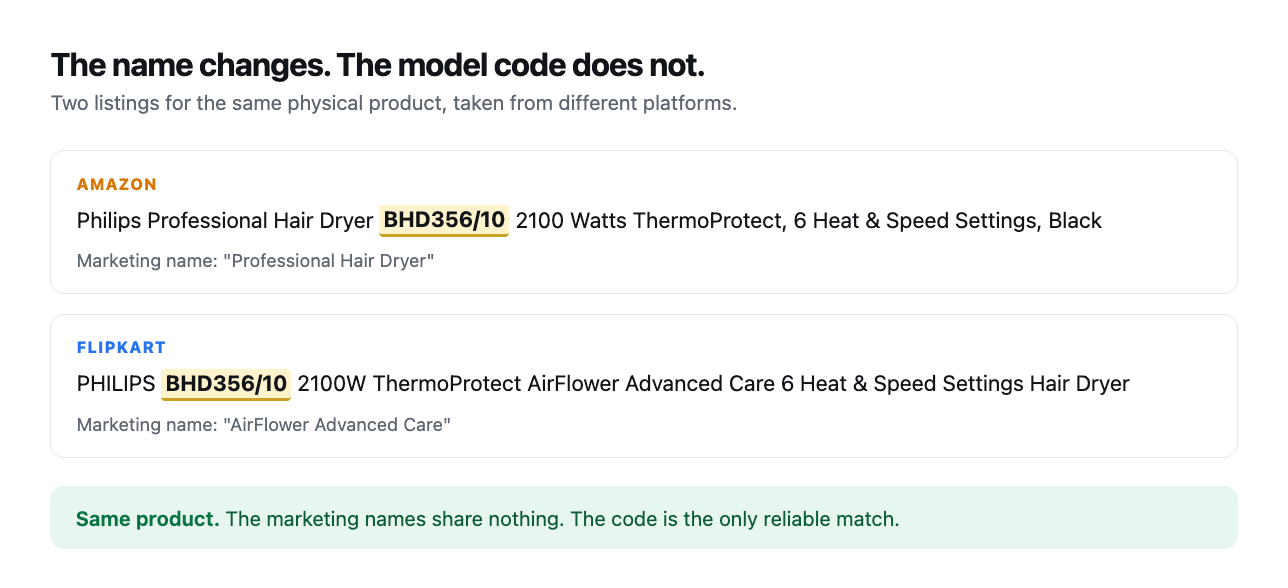
Look at the two listings in the image above. Same dryer, same code, and the marketing names have nothing in common. One calls it a Professional Hair Dryer, the other AirFlower Advanced Care.
If you searched Flipkart for Professional Hair Dryer you would get hundreds of
results and this one might not be near the top. Search BHD356 and you land on
it directly.
This is also why matching by name at scale fails badly. When we tried it, near identical titles kept pairing different products, and the only fix was to stop trusting names entirely.
Using it
- Find the code on the listing you are looking at.
- Paste it into the other platform's search box, on its own.
- Compare the rupee prices on the two results.
- If the codes differ even slightly, they are different products.
HD3151andHD3161are not the same dryer.
That last point catches people out. A single digit usually means a different wattage, a different attachment set, or a different colour with a different price.
The shortcut
This is exactly what this site does. Every product page shows the same model code across Amazon, Flipkart and Nykaa with the current price on each, so you do not have to run the search yourself. You can also start from a brand. Philips, Havells and Vega each list every code we hold for them.
If you want to know whether the discount attached to those prices is real, that is a separate question.